Azure Cosmos DB is a fully managed, globally distributed database service that supports multiple data models and APIs. It allows you to treat one database service as if it were many different databases by offering multiple APIs: NoSQL (Core SQL), MongoDB, PostgreSQL, Cassandra, Gremlin (graph), and Table.
See first part: Azure Cosmos DB: Introduction.
This article reviews Core (SQL) API - the native API for Cosmos DB, storing data as JSON documents and allowing SQL-like queries over that JSON. It provides the flexibility of schemaless NoSQL storage combined with the power of SQL query syntax.
What is the Core (SQL) API and when to use it
The Core (SQL) API - also called the SQL API or NoSQL API - is the default and native API for Azure Cosmos DB. Data is stored as flexible JSON documents inside containers (analogous to collections or tables). You can then query these JSON items using a SQL-like query language (a variant of SQL over JSON documents) or perform point lookups by key. This API gives you the schema-flexibility of NoSQL with a familiar SQL querying capability.
Use cases: the Core API is a great choice for new applications that can fully embrace Azure Cosmos DB's native features. For example, if you're building an e-commerce platform with a variety of product types or a social app with evolving data models, a document-oriented approach fits well.
The Core API shines in scenarios where data models may change over time or differ between items - you can add new JSON fields without schema migrations. For instance, adding a new product category is as simple as inserting a JSON document with a new structure, with no downtime or schema alterations.
Many modern web/mobile apps, IoT scenarios (storing device readings as JSON), and user profile stores use document databases like Cosmos Core API for this reason. In short, choose Core (SQL) API when you want flexible, semi-structured data with rich querying, or if you don't have a pre-existing preference for another API. It offers broad querying capabilities and integrates with Cosmos DB SDKs directly.
Setting Up a Core (SQL) API Account in Azure Portal
Setting up a Cosmos DB Core API account is straightforward:
Create a new resource: in the Azure Portal, click Create a resource and search for "Azure Cosmos DB". Select Azure Cosmos DB for NoSQL (Core API).
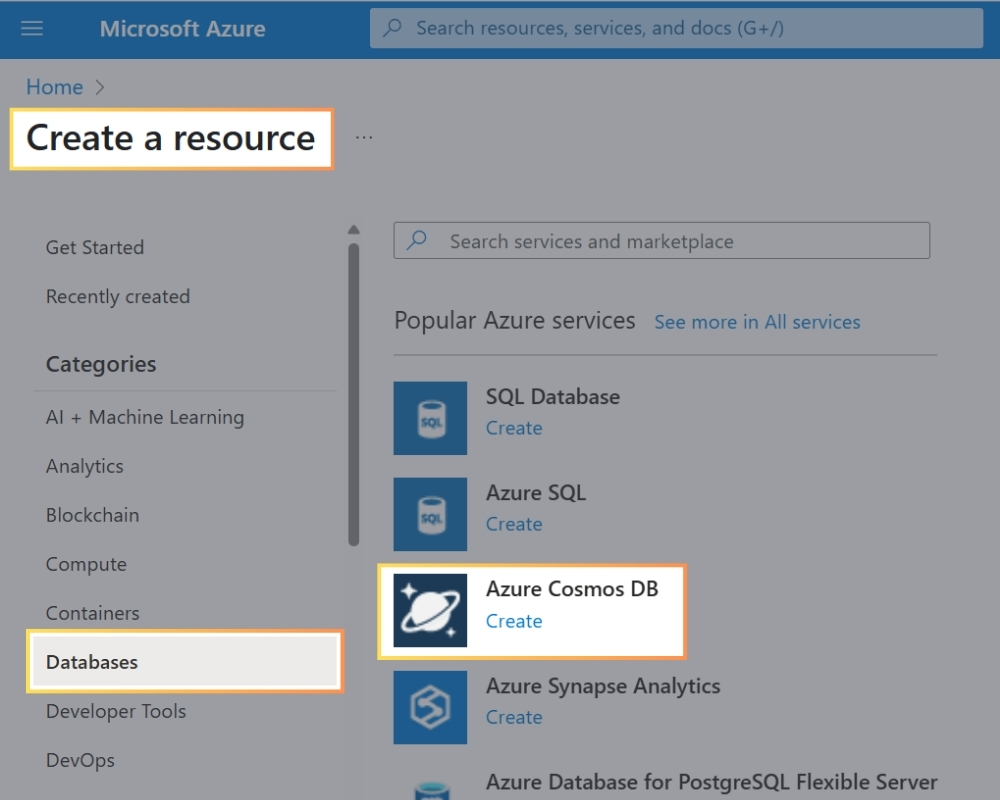
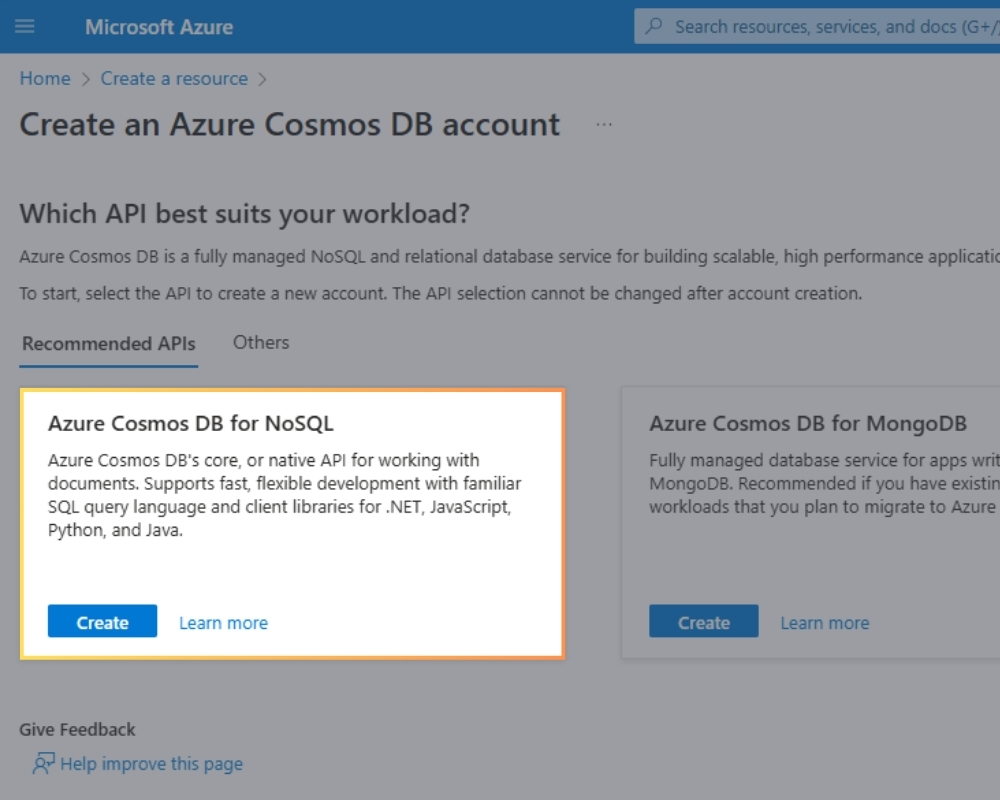
Configure account: provide an account name, select your Azure subscription and resource group, then choose a data center region for your database. Under Capacity mode, you can typically leave the default (Provisioned throughput) for now. Ensure the API is set to Core (SQL) or NoSQL.
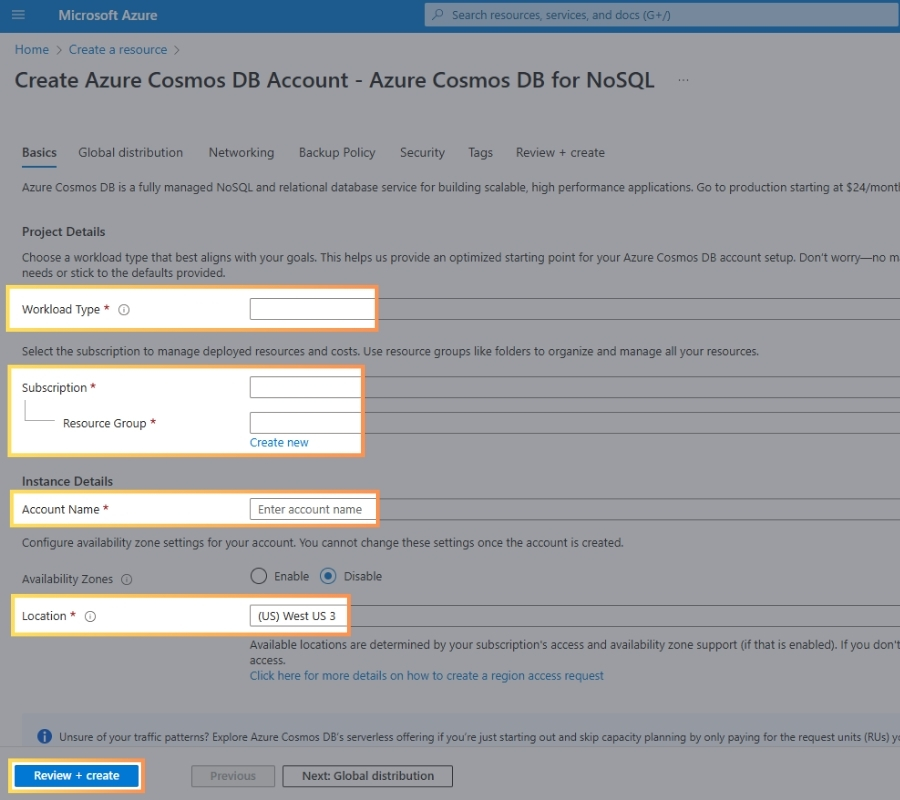
Review and create: complete any other settings (like enabling geo-redundancy or multi-region writes if needed), then click Review + create and finalize the creation.
It may take a few minutes for Azure to deploy the account. Once done, you'll have a Cosmos DB account with a Core API endpoint (e.g., your-account.documents.azure.com). In the portal, the Data Explorer blade allows you to create databases, containers (collections), and items (documents) within this account.
Pro Tip: when creating a container in a Core API database, you'll specify a Partition Key - a property in your JSON that Cosmos will use to distribute data for scalability. Choosing a good partition key (one that evenly distributes your workload) is crucial for performance, as Cosmos DB partitions data and operations based on that key. We will review this aspect below.
Data Model, Queries, and Indexing in Core API
Data model
JSON documents in the Core API can have arbitrary structures. There is no fixed schema; each item (document) can contain different fields. However, you might establish some conventions (e.g., a "type" field) to differentiate entities.
All documents must have an id (unique identifier) and will also have a system-defined _rid (resource ID), _ts (timestamp), etc. Documents are grouped into containers, which are grouped into databases under the account.
Query capabilities
The Core API supports a rich SQL-like query language over JSON. For example:
- SQL Select syntax: you can do
SELECT * FROM c WHERE c.status = "Active" to retrieve documents with a certain field value. The SQL language supports filtering on nested JSON properties, projections, aggregations, JOINs within a single item array, UDFs (user-defined functions), and more. It is not exactly T-SQL, but if you know SQL, the learning curve is small.
- Point reads: if you know the id and partition key of an item, you can do a direct read which is faster and cheaper than a query. Cosmos DB treats this as a key-value lookup operation.
- Transactions: in the Core API, you can achieve ACID transactions on a single partition (for example, batching multiple document updates that share the same partition key). This can be done using stored procedures or the newer transactional batch feature in the SDK. Cross-partition transactions are not supported (which is common in NoSQL systems), so design your data model to keep related items in the same partition if they need atomic updates.
Indexing
By default, Azure Cosmos DB automatically indexes all properties of all items in a container, without requiring you to define schema or indexes explicitly. This means you can query on any field and get fast responses.
You can customize the indexing policy (to exclude certain properties or use lazy indexing) for optimization, but out-of-the-box, you get schema-agnostic indexing on everything. This is a huge convenience - you typically do not need to manually create indexes for queries, unlike some other databases.
One of Cosmos DB's strongest features is its performance at scale. Key considerations for the Core API:
Throughput (RUs)
A Request Unit (RU) represents the cost of a database operation in terms of system resources - CPU, IOPS, and memory. All operations in Cosmos DB (reads, writes, queries, stored procedures, etc.) consume RUs, and you provision or autoscale a container with a certain RU/s (Request Units per second) throughput. For example:
- a simple read of a 1 KB item by ID and partition key consumes 1 RU.
- More complex operations such as aggregations, cross-partition queries, or large payload writes can cost tens to thousands of RUs.
Why RUs Matter
- Billing: you're charged based on the provisioned or consumed RUs.
- Performance: when your operations exceed the allocated RU/s, Cosmos DB throttles the requests (HTTP 429) until RUs become available again.
- Scalability: you scale performance by increasing RUs.
There are 3 types of throughputs:
- Provisioned Throughput (manual RU/s)
- You allocate a fixed RU/s (e.g., 1000 RU/s).
- Guaranteed availability.
- Suitable for predictable workloads.
- Autoscale Throughput
- Automatically scales between a min and max (e.g., 100-1000 RU/s).
- Ideal for variable workloads.
- Billed based on maximum RUs used in the hour.
- Serverless (Consumption-Based)
- You pay per operation (per RU used).
- Best for infrequent or bursty workloads.
Throttling and HTTP 429
If your request exceeds available RU/s, Cosmos DB responds with:
- HTTP 429 Too Many Requests
- Includes a Retry-After header in milliseconds
This is not an error, but a signal to back off and retry. The SDK handles retries automatically by default.
How to Optimize RU Consumption
- Design Small Documents: the larger the document, the more RUs required to read/write it; normalize or split data if documents exceed several KBs unnecessarily.
- Use Efficient Queries: use filters with the partition key; avoid SELECT *; project only necessary fields; avoid unbounded ORDER BY or OFFSET.
- Tune Indexing Policy: Cosmos DB automatically indexes all properties by default. Disable or customize indexing if not needed to reduce RU usage.
- Avoid Cross-Partition Queries: design queries that can target a single partition. If cross-partition is required, ensure queries are efficient.
- Use Stored Procedures: stored procedures run within a single partition, reducing RU overhead for multi-operation transactions.
Partitioning
Partitioning is a foundational concept in Azure Cosmos DB that enables it to provide elastic scalability and high performance. By intelligently distributing data across physical infrastructure, Cosmos DB ensures it can serve high-throughput and low-latency workloads at global scale.
There are two main types of partitions:
- Logical Partitions: these are defined by a unique partition key value. All data items with the same partition key belong to the same logical partition. Each logical partition can store up to 20 GB of data and consume up to 10,000 RU/s.
- Physical Partitions: these are the actual infrastructure units managed internally by Cosmos DB. One physical partition may contain one or more logical partitions.
Each document in Cosmos DB must include a partition key, which is a property used to determine the partition where the document resides.
Why Partitioning Matters
Effective partitioning directly affects:
- Scalability: allows Cosmos DB to scale out across multiple nodes.
- Performance: poor partitioning can lead to request throttling, high latency, or even failed operations.
- Cost: RU/s (Request Units per second) consumption can vary greatly depending on partition key distribution.
Partitioning Strategies
Cosmos DB uses hash-based partitioning by default. The system applies a hash function to the partition key value to determine which physical partition will store a given logical partition. Internally, Cosmos DB manages physical partitions using range-based partitioning, allowing efficient data movement as partitions are split or merged.
The choice of partition key is critical. A good partition key enables:
- Even distribution of data across partitions
- Even distribution of workload (reads/writes)
- High cardinality, meaning many unique values
- Alignment with your query patterns
Examples of good partition keys:
userId for user-centric datadeviceId for telemetry systemstenantId for multi-tenant applications- Composite or synthetic keys like
userId_region for more control
Poor choices of partition keys: country, status, or type - these typically have low cardinality, leading to skewed distribution and performance bottlenecks.
Hot and Cold Partitions
A hot partition arises when a single logical partition receives a disproportionate amount of traffic, usually due to an unbalanced partition key. This can result in:
- Request throttling (HTTP 429 errors)
- Increased latency
- Suboptimal utilization of provisioned throughput
Hot partitions are often caused by low-cardinality partition keys or access patterns that focus on one or few key values (e.g., a single region or status).
Cold partitions, on the other hand, are those that store data but receive little or no traffic. While not harmful in isolation, they can lead to inefficient use of provisioned RU/s in scenarios where throughput is not shared or scaled automatically.
Latency and SLA
Cosmos DB guarantees single-digit millisecond latencies for reads and writes (at the 99th percentile) on the Core API for items up to 1KB, typically. This is backed by an SLA for latency, availability, throughput, and consistency. To achieve this, avoid heavy server-side scripts or cross-partition queries when possible.
Global distribution
You can add multiple regions to your Cosmos account at any time. With Core API, you can enable multi-region writes (so writes can be made locally in any region) or keep a single write region with many read regions. Cosmos will replicate data and keep it consistent per the chosen consistency level (Strong, Session, etc.). This is great for performance if your users are worldwide - they connect to their nearest region for low-latency access.
Consistency levels
Cosmos DB Core API offers five consistency levels from Strong (linearizable, most consistent) to Eventual (highest performance):
- Strong
- Bounded staleness
- Session
- Consistent prefix
- Eventual
The default is Session consistency, which is often a good balance. Consistency dictates read performance and staleness - you can tune this per request or per account.
Beginners can usually stick with the default unless your scenario demands strict consistency. Overall, the Core API provides fast, scalable reads and writes with tunable consistency. With proper partition key choice and throughput provisioning, it can handle massive workloads globally. Cosmos DB automatically handles the heavy lifting of scaling storage and throughput.
C# Example: Connecting and Querying the Core API
Let's look at a simple example in C# (.NET) that connects to a Cosmos DB Core API account, creates a database and container, inserts an item, and queries it. We'll use the Azure Cosmos DB .NET SDK (Azure.Cosmos client library):
using Microsoft.Azure.Cosmos;
using Microsoft.Azure.Cosmos.Linq;

public class User
{
    public string Id { get; set; }
    public string TenantId { get; set; } // Partition key
    public string FirstName { get; set; }
    public string LastName { get; set; }
    public string Email { get; set; }
    public bool IsActive { get; set; }
}

public class Program
{
    // Make sure the Connection String is secured
    private const string CosmosDbConnectionString = "";
    private const string DatabaseName = "TenantDB";
    private const string ContainerName = "Users";
    private const string PartitionKeyPath = "/tenantId";

    static async Task Main()
    {
        // Make sure you properly inject the CosmosClient
        using CosmosClient cosmosClient = new(CosmosDbConnectionString);

        // Create database and container
        Database database = await cosmosClient.CreateDatabaseIfNotExistsAsync(DatabaseName);
        Container container = await database.CreateContainerIfNotExistsAsync(ContainerName, PartitionKeyPath);

        // Create a sample user
        var user = new User {
            TenantId = "tenant-001",
            FirstName = "Ivan",
            LastName = "Vydrin",
            Email = "ivan@example.com",
            IsActive = true
        };

        await container.CreateItemAsync(user, new PartitionKey(user.TenantId));
        Console.WriteLine($"Inserted user with id: {user.Id}");

        // Query active users for a specific tenant
        using var queryIterator = container.GetItemLinqQueryable(
            requestOptions: new QueryRequestOptions {
                PartitionKey = new PartitionKey("tenant-001")
            })
            .Where(u => u.IsActive)
            .ToFeedIterator();

        var results = new List();

        while (queryIterator.HasMoreResults)
        {
            FeedResponse response = await queryIterator.ReadNextAsync();
            results.AddRange(response);
        }

        foreach (var u in results)
        {
            Console.WriteLine($"Found active user: {u.FirstName} {u.LastName} ({u.Email})");
        }
    }
}
Azure Cosmos DB provides a powerful, globally distributed database service with the Core (SQL) API offering flexible JSON document storage and rich query capabilities. By understanding concepts like RUs, partitioning, and consistency levels, you can build scalable applications that leverage Cosmos DB's performance guarantees while controlling costs.